Over-The-Air (OTA) Download#
The Evo library has built in Over-The-Air support based on ArduinoOTA. OTA update is supported in both Arduino IDE 2 and PlatformIO. It uses the Wi-Fi feature on the Evo and can work in Station mode (STA_MODE) and Access Point mode (AP_MODE). In STA_MODE, the Evo connects to a Wi-Fi access point that the computer is also connected to. In AP_MODE, the Evo creates an access point and the computer is able to connect to it.
OTA Usage#
To be able to perform OTA the following requirements must be met.
It must not be in a program crashed state.
It also must not be in any loop without delay being called at some point in the code.
The Wi-Fi connection on the EVO must not be used for anything else.
OTA must be initialised via code and have been downloaded into the Evo via a wired connection.
If station mode is used, the Wi-Fi network needs to be 2.4GHz.
The following program shows how the OTA feature is enabled. The OTA feature will run in the background while other functions still function.
 1#include <Evo.h>
 2
 3EVOX1 evo;
 4// If STA_MODE is used
 5OTAHandler ota(STA_MODE, "EvoX1-OTA", "NetworkSSID", "Networkpassword", "ArduinoOTAPassword");
 6
 7//If AP_MODE is used
 8//OTAHandler ota(AP_MODE, "EvoX1-OTA", "NetworkSSID", "Networkpassword", "ArduinoOTAPassword");
 9
10void setup()
11{
12   evo.begin();
13   ota.begin();
14
15}
16
17void loop(){
18   delay(1)
19}
If AP_MODE is selected, the Evo will generate a 2.4GHz access point where the SSID is given by NetworkSSID and password is Networkpassword. Connect to that network to allow OTA update.
OTA update on Arduino IDE 2#
When the Evo is running OTA and the computer is connected to it via Wi-Fi, you should see the device on select board.
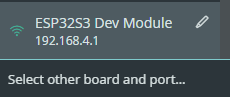
When you download code to it for the first time, it will prompt you for the ArduinoOTAPassword.
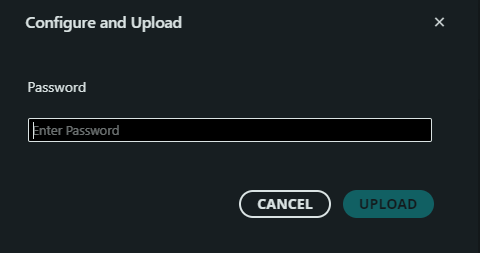
Password is required for the first time and no longer reguired subsequently.
OTA update on PlatformIO#
To download on PlatformIO, the platform.ini needs to be configured correctly. Add the following into platform.ini.
The upload_port is given by the name set in the OTA declaration.
--auth is the password set in ArduinoOTAPassword
1[env:OTA]
2platform = platformio/espressif32
3board = esp32-s3-devkitm-1
4framework = arduino
5upload_protocol = espota
6upload_port = EvoX1-OTA.local
7upload_flags = --host_port=55910, --auth=admin